
Before you post: Your responses to these questions will help the community help you. Please complete this template if you’re asking a support question.
Don’t forget to select tags to help index your topic!
1. Describe your incident:
I’m currently setting up an alert in Graylog to notify me when someone logs in via SSH from an IP address. So far, the alert is working as expected.
What I want to do now is to refine the alert — I only want to be notified if the SSH login comes from an IP address that is outside a specific trusted range (e.g. 100.100.100.1 to 100.100.100.5).
The goal is to ignore logins from trusted IPs and only alert when the source IP is not part of that trusted list.
2. Describe your environment:
I am using Graylog 6.1.0
3. What steps have you already taken to try and solve the problem?
I’m currently using a Lookup Table approach. Here are the steps I’ve taken so far:
1.Created a Data Adapter using a CSV file and placed the file on the server.
→ I tested the adapter, and the lookup returns the correct value. Fig.01
2. Configured the Cache for the adapter. Fig.02
3. Created and configured the Lookup Table, linking it to the adapter and cache. Fig.03
4. Verified that the lookup works correctly via the test function in the Lookup Table. Fig.04
5. Here is my Pipeline rule
rule "Audit - sshd: login accepted (password)"
when
    contains(to_string($message.message), "sshd[") AND
    contains(to_string($message.message), "Accepted password for")
then
    let grok_pattern = "%{HOSTNAME:hostname} %{WORD:process}\\[%{NUMBER:pid}\\]: Accepted password for %{USERNAME:target_user} from %{IPV4:source_ip} port %{NUMBER:source_port} %{WORD:protocol}";
    let extracted = grok(grok_pattern, to_string($message.message));
    let source_ip = to_string(extracted["source_ip"]);
    set_field("source_ip", source_ip);


    // Defensive coding: only proceed if IP was extracted
    let ip_parts = split(source_ip, "\\.");
    let ip_int = to_long(ip_parts[0]) * 256 * 256 * 256 +
                 to_long(ip_parts[1]) * 256 * 256 +
                 to_long(ip_parts[2]) * 256 +
                 to_long(ip_parts[3]);

    set_field("ip_integer", ip_int); // 👈 DEBUG OUTPUT

    let trusted_min = 192 * 256 * 256 * 256 + 168 * 256 * 256 + 100 * 256 + 1;
    let trusted_max = 192 * 256 * 256 * 256 + 168 * 256 * 256 + 100 * 256 + 5;

    let outside = ip_int < trusted_min || ip_int > trusted_max;
    set_field("untrusted_check_result", outside); // 👈 TEMP FIELD for confirmation

    // Final flag for alerting
    set_field("untrusted_ssh_login", outside);
end
- Test run rule simulation. I want if it can show the field “Trusted IP” or “Untrusted IP”.Fig.05
4. How can the community help?
- Could there be a mistake in how I’m using the lookup table within the pipeline rule?
- Is there a better or more reliable way to check if an IP address is not in the trusted list?
- What’s the recommended method to troubleshoot or debug the result of
lookup_value()inside a pipeline rule? - Are there any working examples or best practices for using CSV-based lookups in Graylog pipeline rules?
- Do I need to revise or fix my current pipeline rule logic?
Here is the reference Image
Fig.01 -
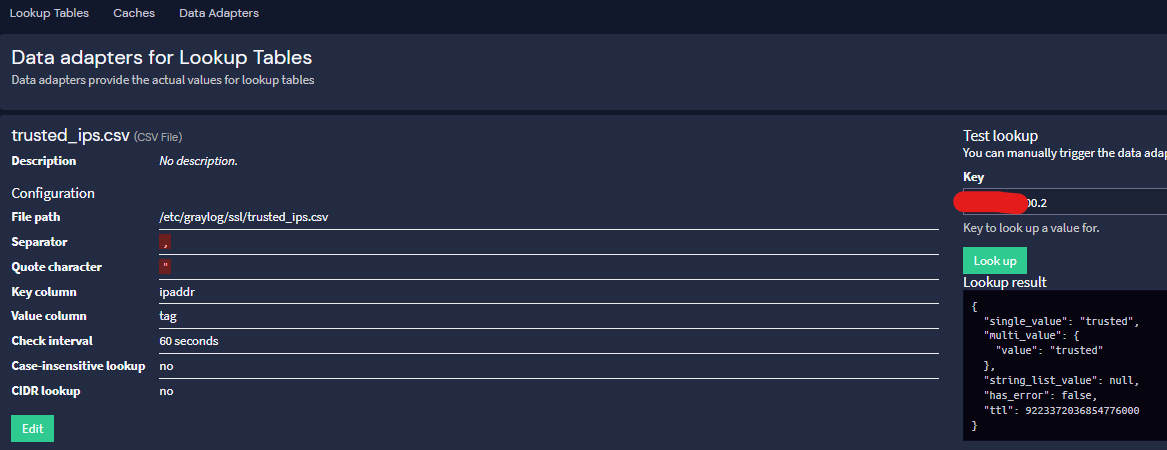
Fig.02 -
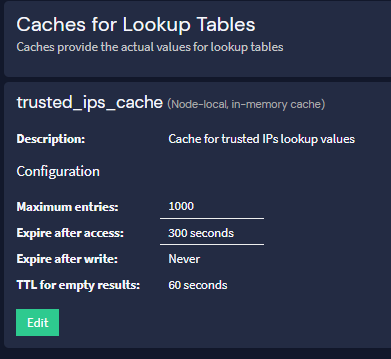
Fig.03 -

Fig.04 -

Fig.05 -
